Product Photos That Convert: Prepare Images for Amazon, Etsy & Shopify

On a marketplace, your photo is your storefront. Shoppers cannot touch the product, feel its weight, or inspect its stitching, so they interrogate your images instead — and the platforms quietly measure how shoppers respond. Every hover, every zoom, every bounce is a data point. Listings with sharp, consistent, compliant photos earn the click; the rest earn page two, where impressions drop by roughly ninety percent and sales become an afterthought.
The technical bar is not high, but it is ruthlessly specific. Each platform has its own crop expectations, pixel minimums for zoom activation, and hard file-size ceilings that will silently reject your upload or degrade your image without warning. A photo that looks stunning on your monitor can arrive on Amazon looking muddy, on Etsy looking cropped wrong, and on Shopify loading so slowly that mobile shoppers leave before the gallery renders. The good news is that a single disciplined workflow solves all of these problems at once. In this guide you will learn exactly what each major marketplace demands, how to prepare every image in three mechanical steps that take under ninety seconds, and the consistency habits that separate professional sellers from hobbyists who wonder why their listings never gain traction.
What Each Platform Actually Demands
Requirements drift over time as marketplaces update their seller policies, but the durable core has remained stable for years. Always re-check the official seller documentation for your specific category before a big launch, because niche categories like jewelry, grocery, and automotive sometimes carry additional rules. Below are the baseline standards that apply to the vast majority of product listings.
Amazon Image Requirements
Amazon is the strictest of the major marketplaces, and for good reason — its A9 search algorithm weighs image compliance as a direct ranking signal. The main image must sit on a pure white background (RGB 255, 255, 255), with the product filling roughly 85 percent of the frame. The minimum resolution is 1000 pixels on the longest side, but that bare minimum only activates basic zoom. To unlock the high-definition zoom that Amazon's own data shows increases conversion by up to nine percent, you need at least 1600 pixels, and 2000 pixels is the sweet spot. JPEG is the preferred format, and every file must stay under 10 megabytes. Secondary images allow lifestyle shots, infographics, and scale references, but the hero image must follow the white-background rule or risk suppression.
Etsy Image Requirements
Etsy is more forgiving aesthetically — lifestyle and styled shots perform well because the audience expects a handmade, curated feel — but the technical specs still matter. The first photo displays best in landscape or square orientation, and Etsy recommends 2000 pixels on the shortest side to ensure crispness on retina screens. Keep each file under 1 megabyte for fast listing-page loads; Etsy's own compression algorithm will re-process your upload, and starting with a bloated file often results in worse quality than starting with a moderately compressed one. You can upload up to ten photos per listing, and the order matters because the first image is your thumbnail in search results.
eBay Image Requirements
eBay's minimum is a modest 500 pixels on the longest side, but 1600 pixels is recommended for zoom activation, which eBay's data links to higher sell-through rates. The platform explicitly prohibits borders, watermarks, and promotional text overlays on any image — violations can lead to listing removal. eBay allows up to 24 free photos per listing, which means there is no excuse for sparse galleries. Use the extra slots for close-ups of textures, labels, and any imperfections if you are selling used items, because transparency reduces returns.
Shopify (Your Own Store)
On Shopify you set the rules, but the proven standard across high-converting stores is 2048 by 2048 pixels square. This resolution looks sharp on every device from a budget Android phone to a 5K iMac, and it future-proofs your catalog against theme changes. The critical constraint is page speed: keep each image under roughly 500 kilobytes so product pages stay quick. Shopify serves images through its own CDN and will generate responsive sizes automatically, but the source file you upload still determines the ceiling of quality and the floor of load time.

The Three-Step Prep That Never Fails a Validator
Whatever the marketplace, the mechanical preparation is identical. Shoot once — plain background, diffuse daylight, steady hands or a cheap tripod — then run every photo through the same three-step pipeline. This approach means you never reshoot for a new platform; you simply re-export.
Step 1 — Crop for the Frame
Square 1:1 is the lingua franca of e-commerce. It grids perfectly on Amazon's search results, Shopify's collection pages, and Etsy's thumbnail carousels without awkward letterboxing or unpredictable crops. Center the product with generous breathing room around the edges; margins matter more than most new sellers expect because tight crops feel claustrophobic on mobile screens and get clipped by platform overlays like the "Best Seller" badge or the heart icon. If your layout demands a circular crop for a specific theme or collection page, start from the square and mask inward — never shoot for a circle natively, because you will lose flexibility everywhere else.
Step 2 — Resize to the Zoom Threshold
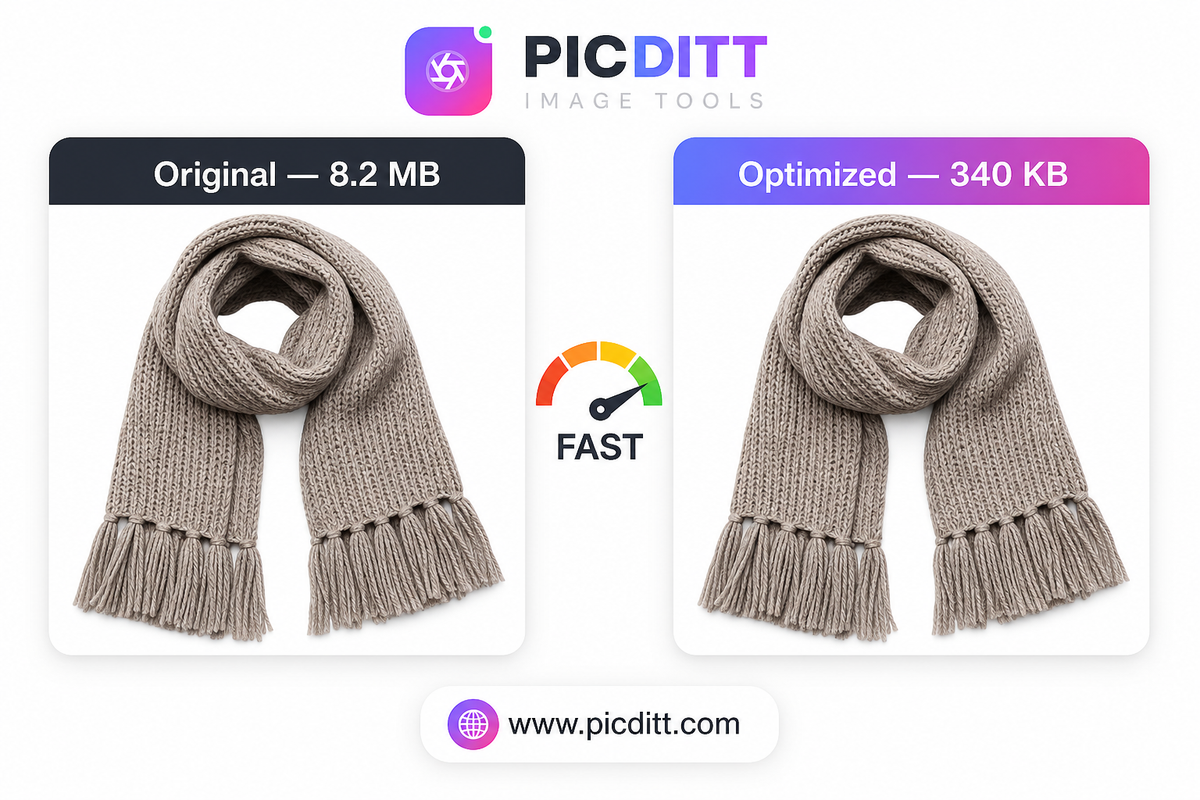
Set the long edge to approximately 2000 pixels. That single number clears every platform's zoom minimum with comfortable margin — Amazon's 1600, eBay's 1600, Etsy's 2000 on the shortest side — without shipping camera-sized files that weigh eight megabytes each and crawl on mobile connections. Use a browser-based image resizer or the resize section inside a compression tool to handle this in one click. Always resize after cropping, never before, because cropping changes the pixel dimensions and you want your final output to hit the target exactly.
Step 3 — Compress Under the Ceiling
Target 200 to 450 kilobytes per image at JPEG quality 80 to 85. This range preserves the fine detail that zoom-happy shoppers look for — fabric weave, wood grain, engraving — while keeping files light enough for sub-two-second page loads. Compressed listings load fast, and you will never see a "file too large" rejection from any major platform. Run the compression as the final step in the pipeline so that the quality setting applies to the already-cropped and already-resized file. This workflow is intentionally one trip through the tool: crop, resize, compress, export, done.
Three steps, about ninety seconds per photo once you have the rhythm — and every output is validator-proof by construction.

Consistency: The Quiet Ranking Factor
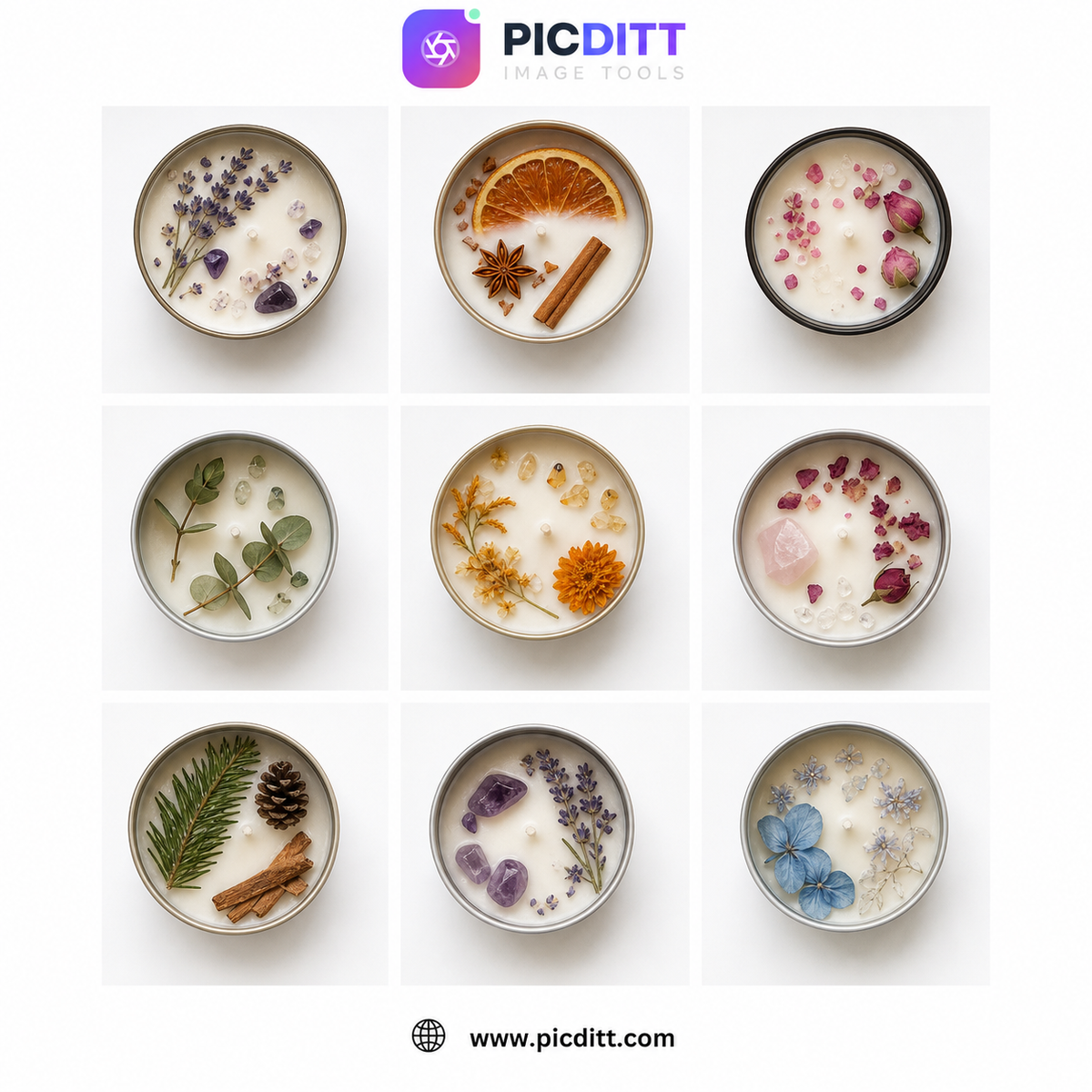
Single-photo quality gets you compliance; set consistency gets you trust. Buyers scanning ten thumbnails in a search results page make a snap judgment about your entire operation within about two seconds. Mismatched crops, drifting background colors, and mixed orientations — one portrait, one landscape, one square — read as amateur and erode the confidence a shopper needs to click "Add to Cart." Whatever visual style you pick, apply the same crop ratio, the same margin proportions, and the same export pipeline to every single SKU in your catalog.
Two extra habits separate professionals from everyone else. First, fix phone-photo orientation before anything goes near a listing. Smartphones embed rotation data in the EXIF header, and some platforms ignore it, resulting in sideways thumbnails that look broken. A quick rotation in any browser tool before export eliminates the problem permanently. Second, strip EXIF metadata before sending originals to a virtual assistant, a supplier, or a third-party listing service. Camera GPS data has leaked more than one home-based seller's residential address onto the public internet, and the fix takes a single click with any EXIF viewer or remover tool.
Files That Help Search Engines Help You
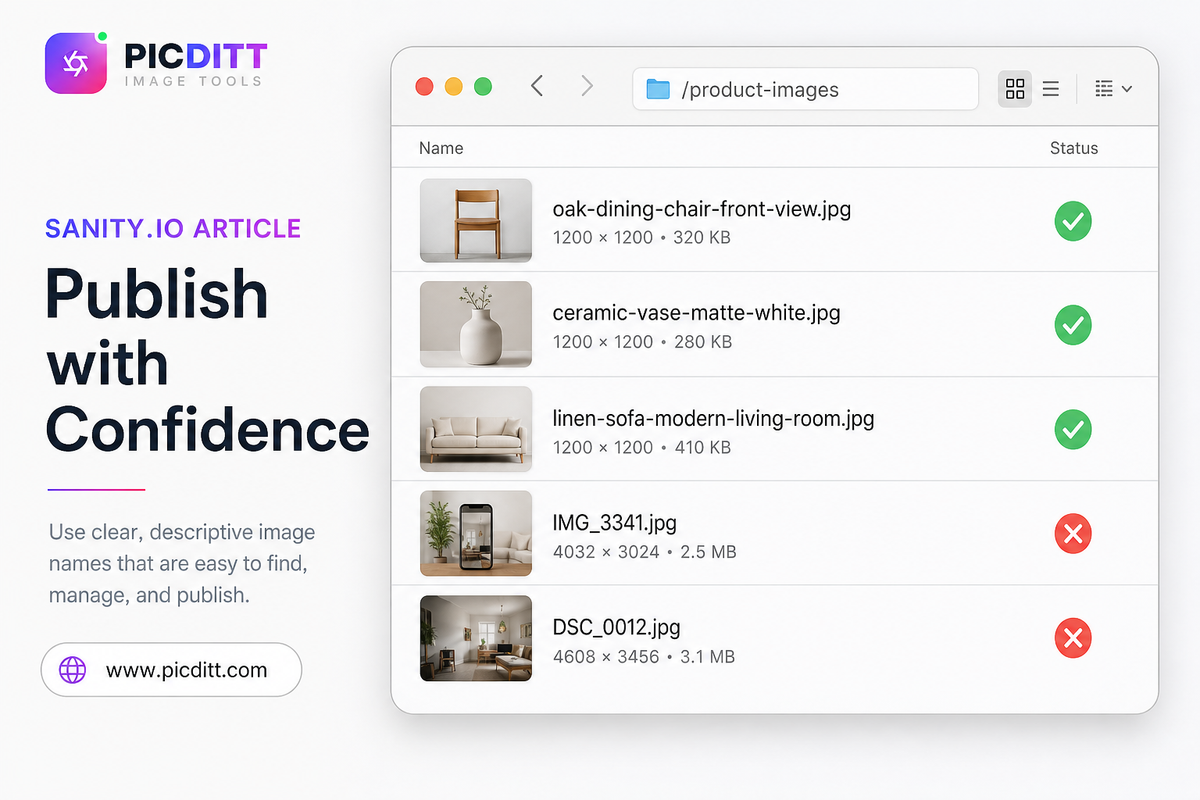
Google Images drives a real and often underestimated slice of commerce traffic, and it reads files, not vibes. The single highest-impact habit is descriptive file naming: export your images as walnut-coffee-table-45cm.jpg or handmade-ceramic-mug-blue-glaze.jpg, never as IMG_4021.jpg or DSC_0093.png. Search engines parse file names as a relevance signal, and descriptive names also help your images surface in visual search results on Google Lens and Pinterest.
On platforms with alt-text fields — Shopify especially, but also your own WordPress or Sanity-powered blog — write the sentence a vision-impaired shopper would thank you for. Describe the material, the color, the angle, and the contents: "Hand-stitched brown leather wallet open to show six card slots and a bill compartment, photographed from above on a white background." This is not keyword stuffing; it is genuine accessibility, and it doubles as an SEO signal that search engines reward.
Keep images in JPEG or WebP at sane dimensions. WebP offers roughly 25 to 35 percent smaller file sizes than JPEG at equivalent visual quality, and every modern browser supports it. Page speed is a confirmed ranking input on your own store, and slow galleries lose shoppers long before they ever see your best shot. Aim for a Largest Contentful Paint under 2.5 seconds on mobile, and your image pipeline is usually the lever that gets you there.
Common Mistakes That Get Listings Rejected or Suppressed
Even experienced sellers stumble on a handful of recurring errors that silently tank performance. Avoiding these will save you hours of re-uploads and customer service headaches.
Uploading camera-original files directly. A 24-megapixel RAW conversion at 12 megabytes will either be rejected outright or crushed by the platform's compressor into something worse than what you would have exported yourself. Always resize and compress before uploading.
Ignoring mobile previews. Over sixty percent of marketplace traffic is mobile, and a photo that looks detailed on a 27-inch monitor can turn into an unrecognizable blur on a 6-inch screen at thumbnail size. Zoom out to roughly 200 pixels wide and ask yourself whether the product is still identifiable. If it is not, increase contrast or simplify the background.
Using watermarks or text overlays on main images. Amazon, eBay, and Etsy all prohibit promotional text, logos, or watermarks on the primary listing image. Violations can result in listing suppression, which means your product disappears from search results entirely until you fix the image.
Mixing color profiles. Shoot and export in sRGB. Adobe RGB and ProPhoto RGB look richer on your calibrated monitor but render with washed-out or neon-shifted colors on most consumer screens and marketplace CDNs. Convert to sRGB as part of your export step.
Neglecting the zoom test. After uploading, actually click the zoom function on your own listing on a phone and a desktop. If the zoomed view is pixelated, your source file was too small. Go back to Step 2 and re-export at 2000 pixels minimum.
Frequently Asked Questions
What size should Amazon product images be?
At least 1000 pixels on the longest side to meet the minimum, but 1600 to 2000 pixels is recommended so that the high-definition zoom feature activates. The product should fill about 85 percent of the frame, and the main image must have a pure white background. A square 2000 by 2000 pixel JPEG at quality 85 clears every requirement in a single export.
Why do my Etsy photos look blurry after upload?
This is almost always caused by undersized originals or over-compression that Etsy's own server-side compressor then crushes a second time. Export at approximately 2000 pixels on the shortest side at JPEG quality 80 to 85, and the results stabilize immediately. Avoid uploading files larger than 1 megabyte, because Etsy's re-compression of large files is more aggressive and produces worse artifacts than a carefully compressed smaller file.
Square or landscape — which orientation is better?
Square (1:1) is the safest default across Amazon, Shopify, and Etsy grids because it prevents unpredictable cropping in search thumbnails and collection pages. Add landscape shots as secondary images on Etsy, whose cover slot in some category pages favors wider aspect ratios, but keep the primary set consistent. If you sell on multiple platforms from one catalog, square is the one ratio that works everywhere without modification.
How do I keep product file sizes small without losing detail?
Resize to about 2000 pixels on the longest edge, then compress as JPEG at quality 80 to 85. That combination keeps zoom-worthy detail intact while landing at 200 to 450 kilobytes — light enough for fast page loads and well within every platform's file-size limits. If your store supports WebP, convert the final output to WebP for an additional 25 to 35 percent size reduction at equivalent visual quality.
Do I need a professional camera for marketplace product photos?
No. A modern smartphone with a 12-megapixel sensor or higher, shot in good natural light on a plain background, produces more than enough resolution for every marketplace requirement. The difference between amateur and professional listings is almost never the camera — it is the lighting, the background consistency, and the post-processing discipline described in this guide.

Final Thoughts
None of this replaces good photography — a poorly lit, cluttered shot will not sell no matter how perfectly you resize it. But in e-commerce, the winners are rarely the best photographers. They are the most disciplined preparers. The sellers who build a repeatable pipeline — shoot, crop, resize, compress, name, upload — and apply it to every single product without exception are the ones who dominate search results, earn the zoom click, and convert browsers into buyers. The tools are free, the steps take ninety seconds, and the payoff compounds with every listing you publish. Start with your next batch of uploads and watch the difference in your metrics within a week.
Summary of All Image Assets
#
Placement
Prompt Summary
Alt Text
Caption
1
After intro
Flat-lay product photography setup with camera, boots, laptop
Product photography setup with camera, tripod, leather boots on white background, and laptop showing ecommerce listing
A simple home setup with natural light is all you need — the real work happens in post-processing prep.
2
After platform requirements
Split-screen four-quadrant platform comparison with ceramic mug
Comparison of product photo styles across Amazon, Etsy, eBay, and Shopify showing different background and styling requirements
Same product, four platforms — each marketplace rewards a slightly different visual approach, but the underlying pixel specs overlap more than you think.
3
After Step 1 (Crop)
Browser crop tool UI with square overlay on wristwatch
Browser-based image cropping tool showing a square 1:1 crop overlay centered on a wristwatch product photo at 2000x2000 pixels
A 1:1 square crop with the product centered and breathing room on all sides is the universal starting point for every marketplace.
4
After Step 3 (Compress)
Before/after scarf photo with file size labels
Before and after comparison showing an 8.2 MB original product photo compressed to 340 KB with no visible quality loss
Proper compression slashes file size by over 95 percent while preserving the detail shoppers zoom in to inspect.
5
After Consistency section
3×3 grid of nine candles, uniform styling
Grid of nine handmade candle product photos showing consistent white backgrounds, square crops, and uniform lighting across all images
Visual consistency across your entire catalog signals professionalism and builds the trust that converts browsers into buyers.
6
After SEO section
File browser with good vs bad file names
File browser showing descriptive product image file names with green checkmarks versus generic camera file names with red X marks
Descriptive file names like "oak-dining-chair-front-view.jpg" help search engines understand your images and drive organic traffic.
7
Before Final Thoughts
Laptop mockup of optimized Shopify product page
Laptop showing an optimized Shopify product page for a wooden watch with consistent square product images and fast load speed indicator
When every image is cropped, resized, compressed, and named correctly, the result is a fast-loading listing that converts across every device.
You Might Also Like
Make Your Photos Pop: Free Aesthetic Filters Online (A VSCO Alternative)
Enhance your photos instantly with free online filters. Apply effects, adjust colors, and download high-quality images in seconds.
Read More →
free-social-media-sizes-cropper-perfect-instagram-youtube-and-tiktok-photos-online
Crop images for social media with perfect dimensions in seconds. Free online tool for Instagram, YouTube, TikTok, and more—no signup needed.
Read More →
How to Create Before & After Comparison Photos for Free (Side-by-Side Online)
Before and after comparison photos are the most powerful visual content you can create — for fitness transformations, home renovations, product showcases, beauty results, and dozens of other use cases. This complete guide shows you exactly how to create professional side-by-side comparison images, photo collages, grids, and stacked layouts using a free, 100% private, browser-based tool with no watermarks, no signup, and unlimited usage.
Read More →