50+ Free Online Tools Every Small Business Owner Should Be Using in 2026

50+ Free Online Tools Every Small Business Owner Should Be Using in 2026
Running a small business means wearing every hat simultaneously. You are the marketer, the accountant, the designer, the document manager, the social media manager, and the IT department — all before lunch.
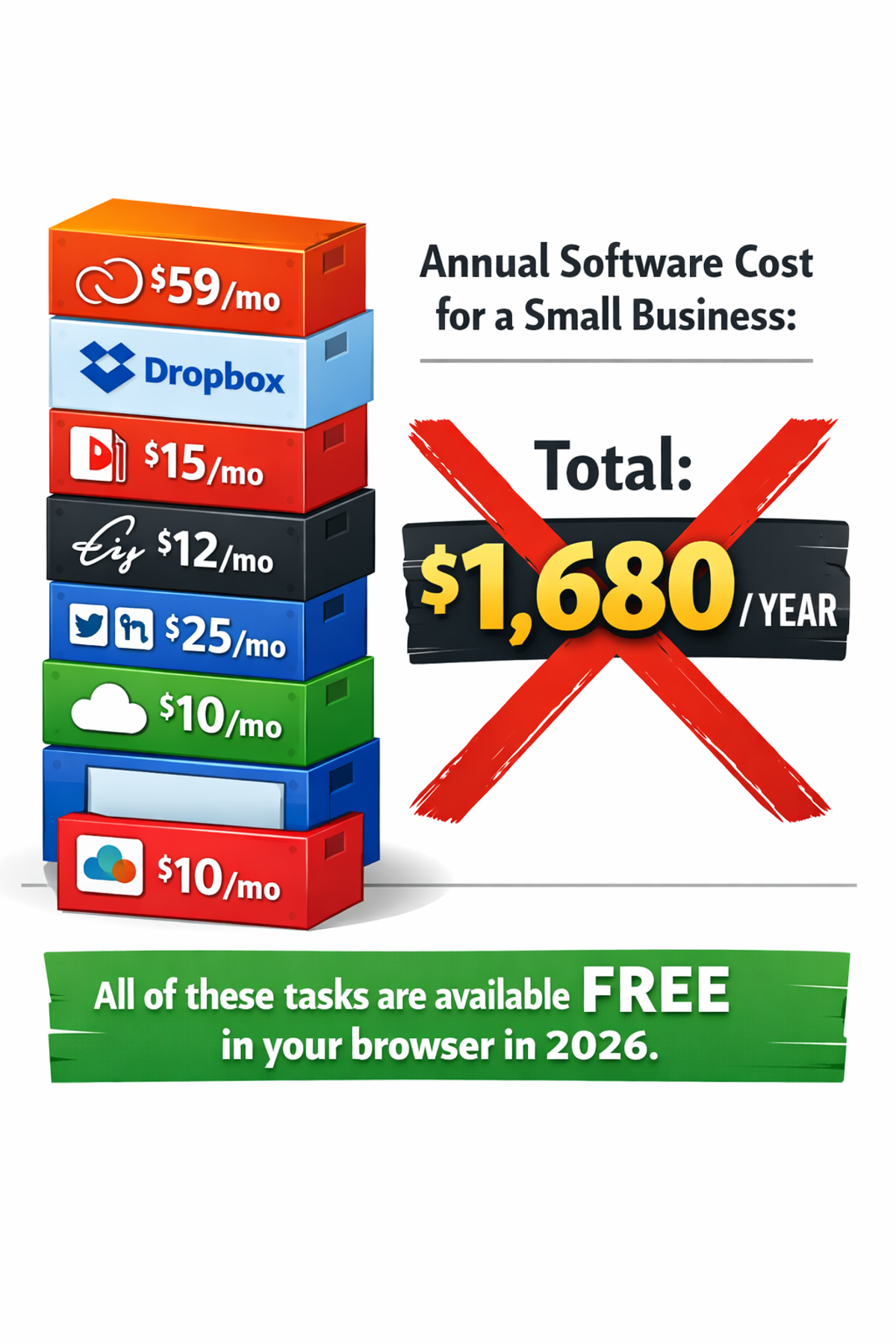
Software companies know this. They have built entire subscription businesses around the small business owner's need to look professional without a dedicated team. Adobe Creative Cloud. DocuSign. Canva Pro. Microsoft 365. These subscriptions add up to hundreds or thousands of dollars per year — for features that free browser-based tools now match or exceed.
In 2026, the gap between paid software and free browser-based alternatives has effectively closed for the vast majority of small business tasks. Everything from compressing product photos to signing contracts to extracting data from PDF invoices can be done instantly, privately, and at zero cost in a web browser.
This guide covers 50+ free tools organized by business function — with specific use cases and direct links so you can bookmark what you need and start saving money today.
Why Free Browser-Based Tools Have Changed Everything
The Technology Shift That Made This Possible
Five years ago, the argument for paid software was legitimate: complex tasks like PDF processing, image editing, and document conversion required server-side processing power that browsers simply could not match.
That changed with WebAssembly (WASM) — a technology that allows complex software to run inside web browsers at near-native speed. Today, the same algorithms that required expensive server infrastructure now run directly on your laptop or phone. Your device does the work. No server involved.
This means:
- Your data stays private — nothing uploads to anyone's server
- Processing is instant — no upload wait time
- Tools work offline — after the page loads, internet is optional
- No accounts needed — open and use immediately
The Privacy Advantage Over Paid Tools
Here is something most small business owners never consider: when you use Adobe Acrobat's web tools to merge a contract, that contract uploads to Adobe's servers. When you use a paid image compression service, your product photos travel across the internet to someone else's computer.
For small businesses handling client contracts, financial records, product images, and employee documents, this creates unnecessary data exposure.
The free tools covered in this guide process everything locally in your browser. Your business documents never leave your device.
Section 1: Image and Visual Tools
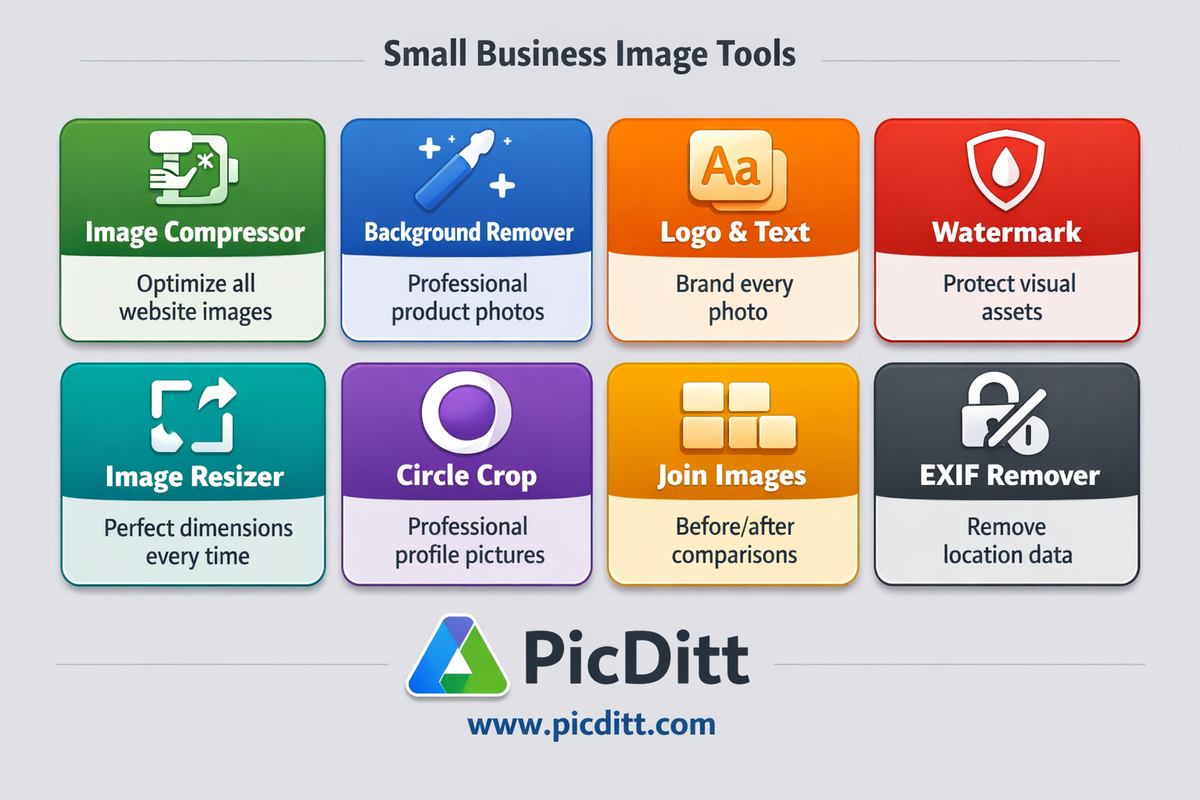
Visual content is at the heart of every small business's marketing. Product photos, social media graphics, website images, and branded content all require image tools. Here is your complete free image toolkit.
Tool 1: Image Compressor
URL: picditt.com/compress
Business use case: Every image you put on your website, email, or social media should be optimized. Uncompressed product photos (4-8MB each) slow your website to a crawl, hurting both customer experience and Google rankings.
What it does: Compresses JPEG, PNG, WebP, GIF, BMP, and HEIC images by up to 90% with a live before-and-after preview. Converts between formats. Batch processes unlimited images with ZIP download.
When to use it:
- Before uploading any image to your website
- Before sending product photos by email
- Before posting to social media
- Converting iPhone HEIC photos to JPEG for universal sharing
Time saved vs paid tools: Adobe Photoshop export — 5+ minutes per image. Free tool — 10 seconds per image.
Tool 2: Background Remover
URL: picditt.com/misc/bg-remover
Business use case: Professional product photography requires clean white or transparent backgrounds. Hiring a photographer or paying for Photoshop to remove backgrounds costs significant money per image.
What it does: AI-powered background removal that works directly in your browser. Creates transparent PNG output suitable for product listings, marketing materials, and presentations.
When to use it:
- Product photos for e-commerce listings (Amazon, Etsy, Shopify)
- Creating professional headshots for team pages
- Preparing images for branded marketing materials
- Profile pictures for business social media
Tool 3: Add Logo and Text to Photos
URL: picditt.com/misc/add-logo-text
Business use case: Every image you share online is a branding opportunity. Adding your logo, website URL, or business name to photos ensures your brand travels with every image you share.
What it does: Adds custom text watermarks, logo overlays, copyright notices, social media handles, and brand elements to any photo. Supports 15 fonts, unlimited colors, adjustable opacity, and tile patterns.
When to use it:
- Branding all product photos before sharing
- Adding copyright protection to portfolio images
- Watermarking images shared on social media
- Creating branded marketing materials from photos
Tool 4: Watermark Tool
URL: picditt.com/misc/watermark
Business use case: Protecting your business's visual assets from competitor theft, especially for product photos, portfolio work, and proprietary imagery.
What it does: Adds professional text and logo watermarks with adjustable opacity, rotation, and tiling patterns. Supports diagonal watermarks that are extremely difficult to remove.
When to use it:
- Protecting product listing photos from competitor copying
- Watermarking client preview deliverables before payment
- Protecting portfolio images shared online
- Marking confidential business document previews
Tool 5: Image Resizer and Zoom Tool
URL: picditt.com/social/zoom-image
Business use case: Different platforms require different image dimensions. Resizing images to exact specifications for each platform without distortion or quality loss.
What it does: Resizes images by percentage, exact pixels, or 40+ platform presets. Supports aspect ratio locking, quality control, and batch processing.
When to use it:
- Preparing images for specific platform requirements
- Resizing product photos to marketplace specifications
- Creating multiple sizes of the same image for different uses
- Reducing oversized images for email or web use
Tool 6: Circle Crop
URL: picditt.com/crop/circle-crop
Business use case: Professional circular profile pictures for Google Business Profile, LinkedIn, Facebook Business pages, and other platforms that display circular avatars.
What it does: Crops any photo into a perfect circle with transparent or colored backgrounds. Outputs as PNG with transparency for seamless placement anywhere.
When to use it:
- Creating profile pictures for all business social accounts
- Making circular team member photos for your website
- Creating circular logo variants for certain platforms
- Preparing circular graphics for marketing materials
Tool 7: Join Images (Before/After Comparisons)
URL: picditt.com/misc/join-images
Business use case: Before-and-after comparisons are among the highest-performing content types for service businesses — salons, renovation contractors, fitness trainers, cleaning services, landscapers.
What it does: Combines multiple photos horizontally, vertically, or in grids. Creates before/after comparisons, product showcases, and photo collages. Supports unlimited images with ZIP download.
When to use it:
- Showcasing service results (renovation, cleaning, landscaping)
- Product comparison images for e-commerce
- Creating multi-angle product showcases
- Compiling event or project documentation
Tool 8: EXIF Data Remover
Business use case: Photos taken at your business location contain GPS coordinates that reveal your exact address. Photos of home-based business operations reveal your home address. Removing EXIF data before sharing protects this information.
What it does: Reads and displays all hidden metadata in photos — GPS coordinates, camera information, timestamps. Removes all or selected metadata before sharing.
When to use it:
- Before sharing any photo taken at a private business location
- Before listing products photographed at your home office
- Before publishing images to websites or social media
- Before sending images to clients or partners
Section 2: PDF and Document Tools
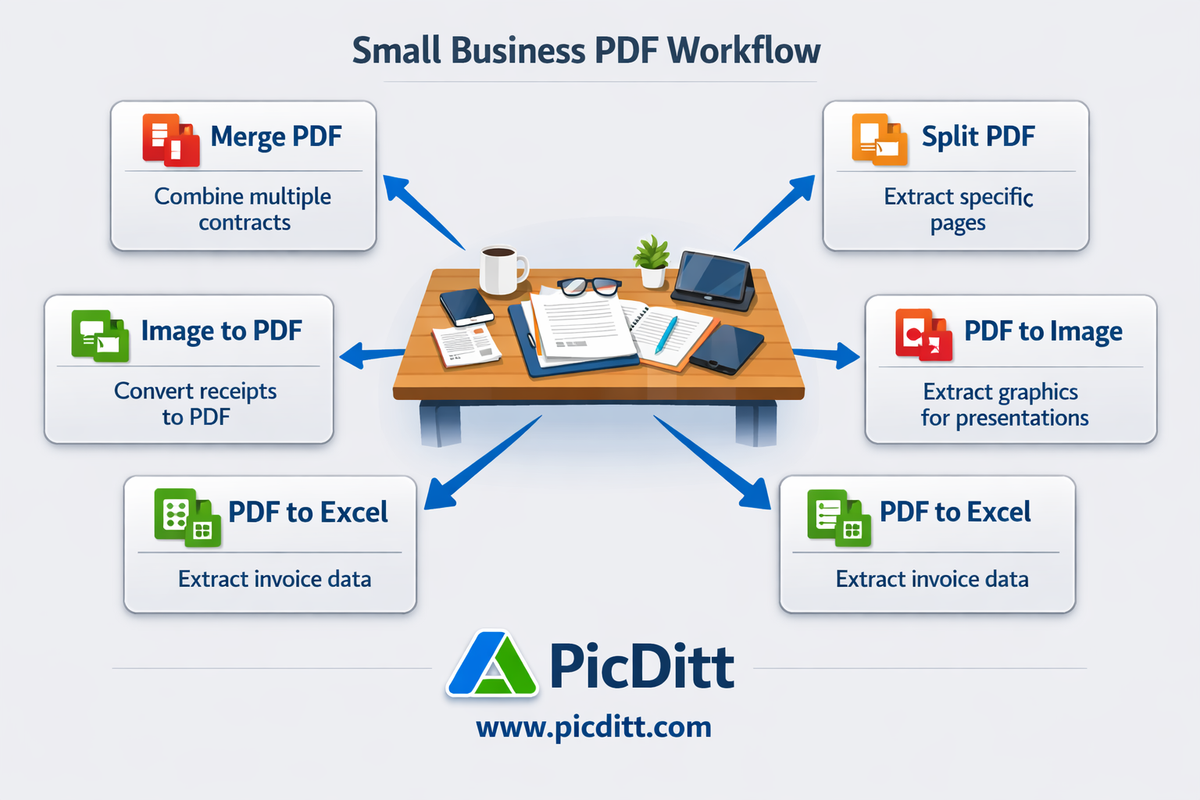
Document management is a daily reality for every small business. Contracts, invoices, reports, forms, and proposals all require PDF handling. Here is your complete free PDF toolkit.
Tool 9: Merge PDF
URL: picditt.com/pdf-tools/merge-pdf
Business use case: Combining multiple documents into a single PDF for client delivery, record keeping, or submission. Merging invoices, receipts, and supporting documents for accounting.
What it does: Combines multiple PDFs into a single document. Drag to reorder pages before merging. All processing happens locally — confidential contracts never upload anywhere.
When to use it:
- Combining a proposal with supporting documents for client delivery
- Merging monthly receipts into a single expense report
- Assembling multi-section reports from separate files
- Creating comprehensive project documentation packages
Tool 10: Split PDF
URL: picditt.com/pdf-tools/split-pdf
Business use case: Extracting specific pages from multi-page documents. Separating individual invoices from batch-exported accounting reports. Pulling specific contract clauses for reference.
What it does: Splits PDFs into individual pages or extracts specific page ranges using a visual thumbnail interface. Download individual pages or as ZIP bundle.
When to use it:
- Extracting specific invoices from a multi-invoice PDF
- Pulling individual pages from a scanned document batch
- Separating sections of a large report for different recipients
- Creating page-specific archives from comprehensive documents
Tool 11: Image to PDF
Business use case: Converting photos of receipts, contracts, ID documents, and forms into professional PDF documents for record keeping and submission.
What it does: Converts JPEG, PNG, WebP, and other image formats into professional PDF documents. Combine multiple images into a single PDF. Customize page size, orientation, and margins.
When to use it:
- Converting receipt photos into PDF expense reports
- Creating PDF portfolios from product or project photos
- Submitting photographed forms as PDF documents
- Converting scanned pages into archiveable PDF documents
Tool 12: PDF to Image
URL: picditt.com/pdf-tools/pdf-to-image
Business use case: Extracting specific pages from PDFs as images for use in presentations, social media, websites, or marketing materials.
What it does: Converts PDF pages to high-resolution JPEG, PNG, or WebP images. Extract single pages or entire documents. Customizable quality settings.
When to use it:
- Extracting charts or graphics from PDF reports for presentations
- Converting PDF product spec sheets into images for websites
- Creating social media graphics from PDF content
- Extracting specific pages for use in marketing materials
Tool 13: PDF to Excel
URL: picditt.com/pdf-tools/pdf-to-excel
Business use case: Extracting data tables from PDF invoices, financial statements, and reports into Excel for analysis without manual retyping.
What it does: Smart parser detects text columns and rows in PDF documents and extracts them into properly formatted Excel spreadsheets. Preview before downloading.
When to use it:
- Extracting invoice line items into accounting spreadsheets
- Pulling financial data from PDF bank statements
- Converting PDF price lists into editable Excel files
- Extracting data tables from supplier or vendor documents
Section 3: Data and Spreadsheet Tools
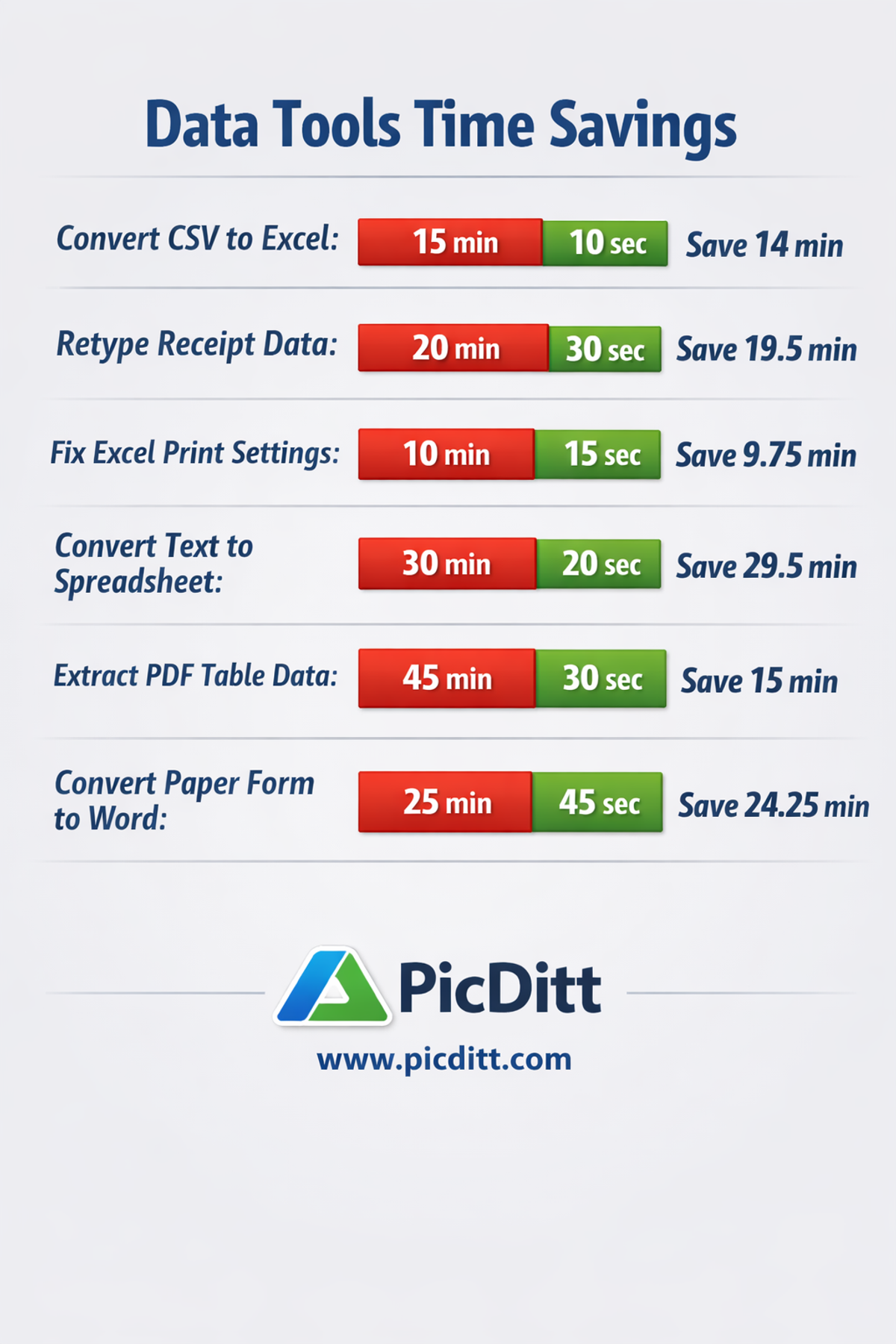
Data management is critical for small businesses handling inventory, customer lists, financial records, and reporting. These free tools eliminate manual data entry and format conversion headaches.
Tool 14: CSV to XLSX Converter
URL: picditt.com/misc/csv-to-xlsx
Business use case: Converting data exports from accounting software, e-commerce platforms, CRM systems, and payment processors from CSV format to properly formatted Excel files.
What it does: Converts CSV files to Excel XLSX format with proper column detection, encoding support, and formatting. Handles all delimiter types automatically.
When to use it:
- Converting Shopify, WooCommerce, or Amazon order exports to Excel
- Processing accounting software data exports
- Converting CRM contact exports for analysis
- Formatting payment processor transaction files
Tool 15: XLSX to CSV Converter
URL: picditt.com/conversion/xlsx-to-csv
Business use case: Converting Excel files to CSV for import into databases, e-commerce platforms, accounting systems, and any software that requires CSV format.
What it does: Converts Excel files to clean, properly formatted CSV with consistent delimiter handling and encoding. Browser-based — your business data never uploads.
When to use it:
- Preparing product catalogs for platform import
- Exporting customer data for email marketing tools
- Converting spreadsheets for database import
- Sharing data with systems that only accept CSV
Tool 16: Text to Excel Converter
URL: picditt.com/misc/text-to-excel
Business use case: Converting pasted data, copied tables, log files, and delimited text from any source into properly formatted Excel spreadsheets.
What it does: Converts any delimited text (comma, tab, semicolon, pipe) to Excel. Supports live preview, column configuration, and multiple export formats.
When to use it:
- Converting data copied from websites into spreadsheets
- Processing log files and system exports
- Converting API response data into Excel
- Cleaning up poorly formatted data files
Tool 17: Image to Excel (OCR)
URL: picditt.com/conversion/image-to-excel
Business use case: Converting photos of tables, receipts, invoices, and printed reports into editable Excel spreadsheets without manual retyping.
What it does: AI-powered OCR reads text from images and converts it to structured Excel data. Supports 11+ languages. Built-in editor for reviewing before download.
When to use it:
- Converting paper receipts to digital expense records
- Extracting data from printed inventory lists
- Digitizing historical paper records
- Converting printed price lists to editable spreadsheets
Tool 18: Image to Word (OCR)
URL: picditt.com/conversion/image-to-word
Business use case: Converting scanned documents, photographed letters, and printed contracts into editable Word documents without retyping.
What it does: Advanced OCR converts images to Word documents. Supports 100+ languages including Urdu, Pashto, Arabic, Hindi, and all European languages. RTL text support.
When to use it:
- Digitizing paper contracts for editing
- Converting printed letters to editable documents
- Extracting text from scanned forms
- Making historical documents searchable and editable
Tool 19: Excel Print Fixer
URL: picditt.com/conversion/excel-print-fixer
Business use case: Fixing Excel spreadsheets that print across multiple pages when they should fit on one — a universal frustration for small business owners printing financial reports, invoices, and data tables.
What it does: Automatically adjusts Excel scaling, margins, and print settings to fit spreadsheets to a specified number of pages for professional printing.
When to use it:
- Before printing any financial report or spreadsheet
- Preparing invoices and quotes for paper delivery
- Printing inventory lists and data tables cleanly
- Fixing spreadsheets that print with one row on a separate page
Section 4: Digital Signature and Document Signing
Paper-based signing is one of the biggest time wasters in small business operations. Printing, signing, scanning, and emailing adds 15-20 minutes to every contract transaction.
Tool 20: Digital Signature Maker
URL: picditt.com/misc/signature
Business use case: Creating a professional digital signature for signing contracts, proposals, quotes, purchase orders, and any other business document electronically.
What it does: Draw, type, or upload a signature. Export as transparent PNG, JPEG, WebP, or SVG at high resolution. All processing is local — your signature never uploads anywhere.
When to use it:
- Signing client contracts and agreements
- Authorizing purchase orders and supplier agreements
- Signing employment documents and NDAs
- Adding signature to email correspondence
- Signing any digital document that requires authorization
Pro tip: Export at 2x or 3x resolution for crisp signature appearance on high-resolution displays and printed documents. Use PNG format for transparent background that works on any document color.
Section 5: Social Media and Branding Tools
Consistent, professional social media presence is essential for small business visibility. These free tools eliminate the need for expensive design software.
Tool 21: Instagram No Crop
URL: picditt.com/social/instagram-no-crop
Business use case: Posting full-size product photos, team photos, and business images on Instagram without losing any part of the image to cropping.
What it does: Fits any photo into a perfect square with beautiful blurred backgrounds, solid colors, or custom brand colors. 50+ background options.
When to use it:
- Posting landscape product photos to Instagram without cropping
- Sharing team event photos that would be cropped awkwardly
- Creating consistent square images for your Instagram grid
- Posting wide-format graphics on Instagram
Tool 22: Instagram Grid Maker
URL: picditt.com/social/grid-maker
Business use case: Creating dramatic product launch reveals, brand announcements, and cohesive profile aesthetics by splitting a single image into a grid of posts.
What it does: Splits any image into 1×3, 2×3, 3×3, 4×3, 5×3, or other grid formats. Numbers tiles for correct posting order. Downloads as ZIP bundle.
When to use it:
- New product launches — reveal the product tile by tile
- Brand announcements and campaign launches
- Creating a cohesive, professional Instagram profile grid
- Seasonal promotions and event announcements
Tool 23: YouTube Banner Maker
URL: picditt.com/social/youtube-banner
Business use case: Creating professional YouTube channel art that looks correct across all devices — desktop, tablet, mobile, and TV — without design software.
What it does: Provides safe zone guides showing exactly what appears on each device type. Outputs channel art at YouTube's optimal 2560×1440 pixel resolution.
When to use it:
- Setting up a new YouTube channel for your business
- Refreshing channel branding for seasonal campaigns
- Creating consistent branding across your YouTube presence
- Updating channel art to reflect business changes
Tool 24: WhatsApp Business DP
URL: picditt.com/social/whatsapp-dp
Business use case: Creating a perfectly sized, professionally formatted profile picture for WhatsApp Business that looks sharp in all display contexts.
What it does: Formats any photo into the optimal square format for WhatsApp profile pictures with background options and positioning controls.
When to use it:
- Setting up or refreshing your WhatsApp Business profile
- Creating a consistent profile picture across all business messaging platforms
- Ensuring your profile picture looks professional at all display sizes
Tool 25: Passport Photo Maker
URL: picditt.com/passport/maker
Business use case: Creating official-specification passport and ID photos for employees, business travel documents, and official business registrations — saving $15-25 per person versus pharmacy services.
What it does: Creates passport photos meeting official specifications for 50+ countries. Virtual outfit feature adds professional clothing. 300 DPI print-ready output.
When to use it:
- Employee passport or visa photos for business travel
- ID photos for business registration or licensing
- Official photos for any government or institutional submission
- Saving money on passport photos for the business owner and employees
Section 6: Privacy and Security Tools
Small businesses handle sensitive data daily — client information, financial records, business communications. These free tools protect that data.
Tool 26: EXIF Data Viewer and Remover
Business use case: Every photo taken with a smartphone contains hidden GPS coordinates, device information, and timestamps. When you share product photos taken at your warehouse, client photos taken at job sites, or team photos taken at your office, you are sharing your exact location data.
What it does: Reads and displays all hidden EXIF metadata in photos. Removes GPS location, device information, timestamps, and other sensitive metadata before sharing.
When to use it:
- Before posting any business photo online
- Before sending photos to clients or partners
- Before listing products on any marketplace
- Before sharing any image containing confidential location information
Tool 27: Image to Word for Business Documents
URL: picditt.com/conversion/image-to-word
Business use case: Digitizing paper business documents — old contracts, printed correspondence, physical forms — into searchable, editable Word documents for digital record keeping.
Why privacy matters here: Business documents contain confidential information. Tools that upload documents to remote servers create unnecessary exposure. This tool processes entirely in your browser.
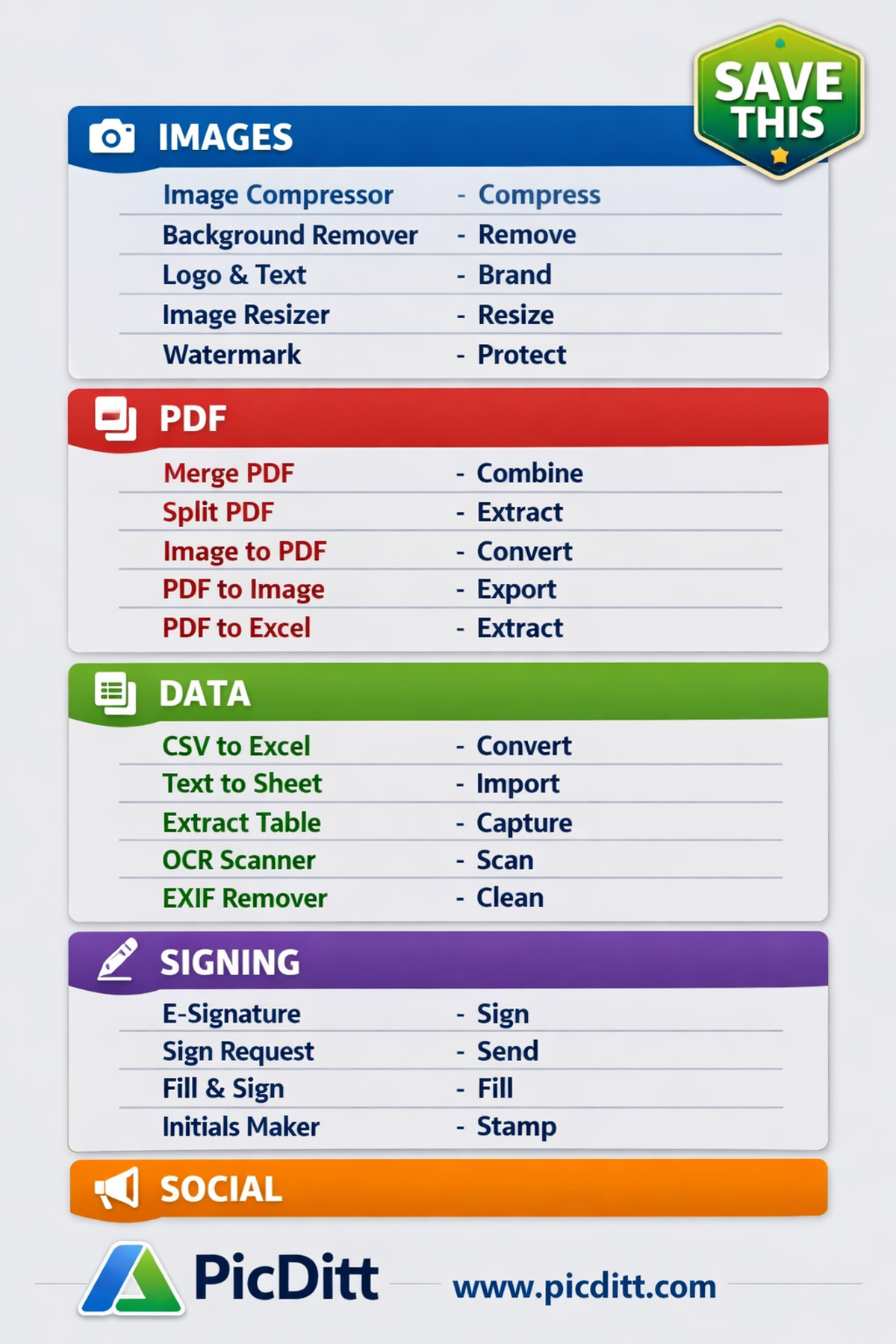
Quick Reference: Complete Tool Directory
Category
Tool
URL
Images
Image Compressor
picditt.com/compress
Images
Background Remover
picditt.com/misc/bg-remover
Images
Add Logo & Text
picditt.com/misc/add-logo-text
Images
Watermark
picditt.com/misc/watermark
Images
Image Resizer
picditt.com/social/zoom-image
Images
Circle Crop
picditt.com/crop/circle-crop
Images
Join Images
picditt.com/misc/join-images
Images
EXIF Remover
picditt.com/misc/exif
Merge PDF
picditt.com/pdf-tools/merge-pdf
Split PDF
picditt.com/pdf-tools/split-pdf
Image to PDF
picditt.com/pdf-tools
PDF to Image
picditt.com/pdf-tools/pdf-to-image
PDF to Excel
picditt.com/pdf-tools/pdf-to-excel
Data
CSV to XLSX
picditt.com/misc/csv-to-xlsx
Data
XLSX to CSV
picditt.com/conversion/xlsx-to-csv
Data
Text to Excel
picditt.com/misc/text-to-excel
Data
Image to Excel
picditt.com/conversion/image-to-excel
Data
Image to Word
picditt.com/conversion/image-to-word
Data
Excel Print Fixer
picditt.com/conversion/excel-print-fixer
Signing
Digital Signature
picditt.com/misc/signature
Social
Instagram No Crop
picditt.com/social/instagram-no-crop
Social
Instagram Grid
picditt.com/social/grid-maker
Social
YouTube Banner
picditt.com/social/youtube-banner
Social
WhatsApp DP
picditt.com/social/whatsapp-dp
Social
Passport Photo
picditt.com/passport/maker
How to Build Your Free Business Tool Stack
Week 1: Set Up Your Visual Toolkit
Start with the tools you will use most frequently:
- Bookmark the Image Compressor — compress every image before it leaves your device
- Test the Background Remover on a product photo
- Create your Digital Signature and save the PNG file somewhere accessible
- Set up your business profile pictures using the WhatsApp DP and Circle Crop tools
Week 2: Streamline Your Document Workflow
Replace your PDF software subscription:
- Use Merge PDF to combine your next multi-part document
- Use PDF to Excel on your next invoice or financial PDF
- Use Image to PDF to convert your next batch of receipt photos
- Use Split PDF to extract specific pages from your next large document
Week 3: Optimize Your Social Media Presence
Build your social media branding toolkit:
- Use Instagram No Crop for your next Instagram post
- Create a YouTube Banner if you have a business channel
- Plan an Instagram Grid layout for a product launch or announcement
Week 4: Protect Your Business Data
Add privacy tools to your routine:
- Use the EXIF Remover on any photo before posting publicly
- Remove metadata from all product photos on your website
- Check what metadata your business photos currently contain
Frequently Asked Questions
Are these tools really free — what is the catch?
All tools listed are completely free with no usage limits, no daily quotas, no file count restrictions, and no watermarks on output. The business model for Picditt is advertising — ads displayed on the tool pages support the free service. You never pay, and your data never gets sold because it never leaves your device in the first place.
Are these tools safe for confidential business documents?
Yes — more so than most paid alternatives. All tools process 100% in your browser. Your contracts, financial documents, employee records, and client files never transmit to any server. You can verify this by opening your browser's network inspector while using any tool and confirming no file upload request occurs.
Do I need to create accounts or sign up for anything?
No. Every tool works immediately without registration, email address, or account creation. Open the URL and start working. This also means there are no passwords to remember and no subscription emails to manage.
What happens if I need a feature these free tools do not have?
For the vast majority of small business tasks, these tools are fully sufficient. For specialized needs like advanced PDF form creation, complex document redaction, or professional print production, paid tools may be necessary. The strategy is to identify which tasks genuinely require paid software and pay only for those.
Can I use these tools on my phone or tablet?
Yes. All tools are fully mobile-responsive and work in any modern browser on iOS and Android devices. Many tasks — like compressing a product photo or removing a background — are particularly convenient to do directly on a phone immediately after taking a photo.
What if a tool stops working or changes?
Browser-based tools that process locally are not dependent on server availability or subscription status. They continue working as long as the page loads and your browser supports the underlying technology. Major changes are always announced.
Are these tools appropriate for businesses handling GDPR-regulated data?
Yes. Since no data leaves your device, these tools are inherently more GDPR-compliant than tools that upload data to remote servers. There is no data processor relationship to manage, no data transfer agreements to execute, and no server-side data retention to worry about. Always consult your legal counsel for specific GDPR compliance requirements in your jurisdiction.

Final Thoughts: Reinvest Your Software Budget
Every dollar you save on unnecessary software subscriptions is a dollar available for marketing, inventory, hiring, or growth. In 2026, the free browser-based tools available to small businesses are genuinely excellent — not compromises, not limited trial versions, not "good enough for now."
They are the right tools for the job. They are faster than server-based alternatives. They are more private than cloud-based paid tools. And they cost nothing.
Start with the three tools you will use most frequently, bookmark them, and build your free tool stack one workflow at a time. Within a month, you will have replaced hundreds of dollars in annual subscriptions with tools that are available whenever you need them, on any device, with no accounts to manage.
Access All Free Business Tools →
You Might Also Like
Free Alternatives to Adobe Acrobat: Do Everything You Need With PDF Files for Free
Adobe Acrobat costs $239.88 per year. Every task you pay for — merging PDFs, splitting pages, converting to images, extracting table data — can be done completely free using browser-based tools that process everything locally with zero server uploads. This complete guide shows you exactly which free tools replace which Acrobat features, how they compare on privacy and quality, and how to do every common PDF task without spending a single dollar.
Read More →
AI Old Photo Restorer & Colorizer: How to Bring Faded Family Photos Back to Life
Old family photos fade, scratch, and lose their color over time—but they don't have to stay that way. Learn how to use PicDitt's free AI Old Photo Restorer & Colorizer to remove damage, enhance details, and add realistic color to black & white images, all directly in your browser.
Read More →